Unlock a New Revenue Stream with MacBook Trade-Ins

Cullin McGrath
Chief Executive Officer

Most MacBook repair shops have experienced this scenario. A customer brings in a MacBook Pro that's no longer worth repairing. Let's say it's a MacBook Pro M3. The screen is fine, but the logic board has failed, and the repair quote is several hundred dollars. They think about it for a moment and decide against the repair. That's understandable.
The repair cost represents a significant portion of a newer MacBook’s price, and they may already be considering an upgrade. They pay the diagnostic fee, put the laptop back in their bag, and leave. That MacBook may no longer make sense as a repair, but it could still make sense as inventory.
When Repairs Turn Into Resale
A declined repair can change the role that the MacBook plays in your business. Instead of remaining a repair job, the device can become inventory that your shop acquires, refurbishes, and eventually resells.
Go back to the MacBook Pro M3 with the failed logic board. Instead of ending the conversation when the customer declines the repair, your shop can offer to buy the device. The customer gets value from a MacBook they no longer want to repair, while your business gains a device that can be refurbished and prepared for resale.
This is where repair shops have an advantage. Your technicians already know how to inspect MacBooks, identify hardware and software problems, estimate repair costs, and determine whether a device is worth refurbishing. The tools, technical expertise, and customers are already there.
By adding buybacks and trade-ins, a MacBook that would have left the store after a declined repair can stay within your business and create another revenue opportunity. From there, your existing repair expertise can prepare the device for its next stage: refurbishment and resale.
Used MacBooks Are Still Worth Buying
A MacBook doesn't lose all of its value when its first owner decides to upgrade. Depending on the model, configuration, age, and condition, used MacBooks can still have enough resale value for repair shops to buy, refurbish, and resell them.
Take a 13-inch MacBook Air M2 (8GB/256GB) as an example. Used or refurbished models in the US can still sell for around $500-$600, depending on their condition and the seller. That resale value gives repair shops room to determine how much they can reasonably spend to acquire and refurbish a device while maintaining a healthy margin.
For a simple example, suppose a shop expects to resell a refurbished MacBook for around $600. If it buys the device for $400 and spends another $100 on parts and labor, the total investment comes to $500. A $600 resale would leave around $100 in potential gross margin before payment fees, warranty costs, returns, overhead, and other selling expenses.
The exact numbers will vary from one MacBook to another, which is where repair shops have an advantage. Your technicians already understand repair costs and device condition, making it easier to evaluate whether a MacBook has enough resale potential to justify the purchase.
Repair shops also have another advantage: existing relationships with parts suppliers and access to components they already use for repairs. Combined with the tools and technicians already in place, access to reliable parts at competitive prices can help keep refurbishment costs under control and create more room for margin at resale.
Price isn't the only advantage repair shops can offer. A refurbished MacBook from a local repair shop can come with a professional inspection, clear information about its condition and battery health, and additional reassurance through a warranty or return policy. The same expertise that helps the shop refurbish the device efficiently can also give the next buyer more confidence in what they're purchasing.
For repair shops, a used MacBook isn't simply an old device. When the numbers make sense, it can become another piece of inventory, another sale, and another source of revenue.
How to Start a MacBook Trade-In Program
Adding trade-ins to your repair business doesn't have to happen all at once. Start by introducing the service to your existing customers, then build a buying-and-resale experience they can trust. From promotion to pricing, a few practical steps can help turn trade-ins into a regular part of your business.
Promote Your MacBook Trade-In Program
Promote the service anywhere customers already interact with your repair business, including your repair counter, website, Google Business Profile, and social media accounts. Your technicians can also introduce trade-ins when a customer declines an expensive repair or mentions they're planning to upgrade.
On social media, share recently acquired or refurbished MacBooks, post models you're currently looking to buy, or show the journey from trade-in to refurbishment and resale. Encourage customers to contact your shop for an offer, or include an estimated buyback range based on the device's configuration and condition. For example, “Buying MacBook Air M3 models this week—get up to $X depending on configuration and condition.”
You can also make your promotions more attractive with upgrade bundles. For example, offer a “MacBook Upgrade Package” that combines a trade-in with data transfer and setup assistance, or bundle a refurbished MacBook with a charger, sleeve, or other accessories.
Seasonal campaigns such as “Back-to-School MacBook Upgrade” can bring these offers together and give customers a timely reason to sell their old MacBook and upgrade through your shop.
Add a Warranty to Refurbished MacBooks
A lower price can attract customers to a refurbished MacBook, but trust can determine whether they actually buy it. A limited warranty and clear return policy can give customers more confidence in purchasing a pre-owned device from your shop.
Give buyers clear information about battery health, the condition of the speaker and camera, and any components that were repaired or replaced. An inspection checklist can also show customers what was tested before the MacBook went back on sale.
The goal isn't simply to offer a cheaper MacBook. It's to give customers a reason to trust the device and the business standing behind it.
Set a Consistent Valuation Process
Your MacBook valuation process should stay consistent across every customer touchpoint. Whether someone checks their device value through your website or brings it directly to your repair shop, the offer should be based on the same pricing criteria.
Consider more than just the MacBook model. Chip generation, memory, storage, battery condition, cosmetic condition, and hardware issues can all affect its value. For example, a MacBook Air M2 with 16GB of memory and 512GB of storage shouldn't be valued the same as an 8GB/256GB configuration.
The same standards should apply during the in-store inspection. If the final offer differs from the online estimate, make the reason clear; for example, the actual battery health or physical condition may differ from what the customer originally submitted.
A consistent process across online valuations and in-store inspections helps customers know what to expect while giving your team a reliable framework for pricing every MacBook that comes through the business.
Use a Platform Built for Buybacks and Trade-Ins
Putting that valuation process into practice doesn't mean your team has to build and maintain the supporting system manually. Reusely provides ready-to-use MacBook product data, including device details and high-quality images, so your team doesn't have to source device information manually or copy it into a separate system.
Reusely also helps keep valuations consistent across your trade-in program. Whether customers start online or visit your repair shop, the same pricing criteria can be used to determine their MacBook's value based on its configuration and condition.
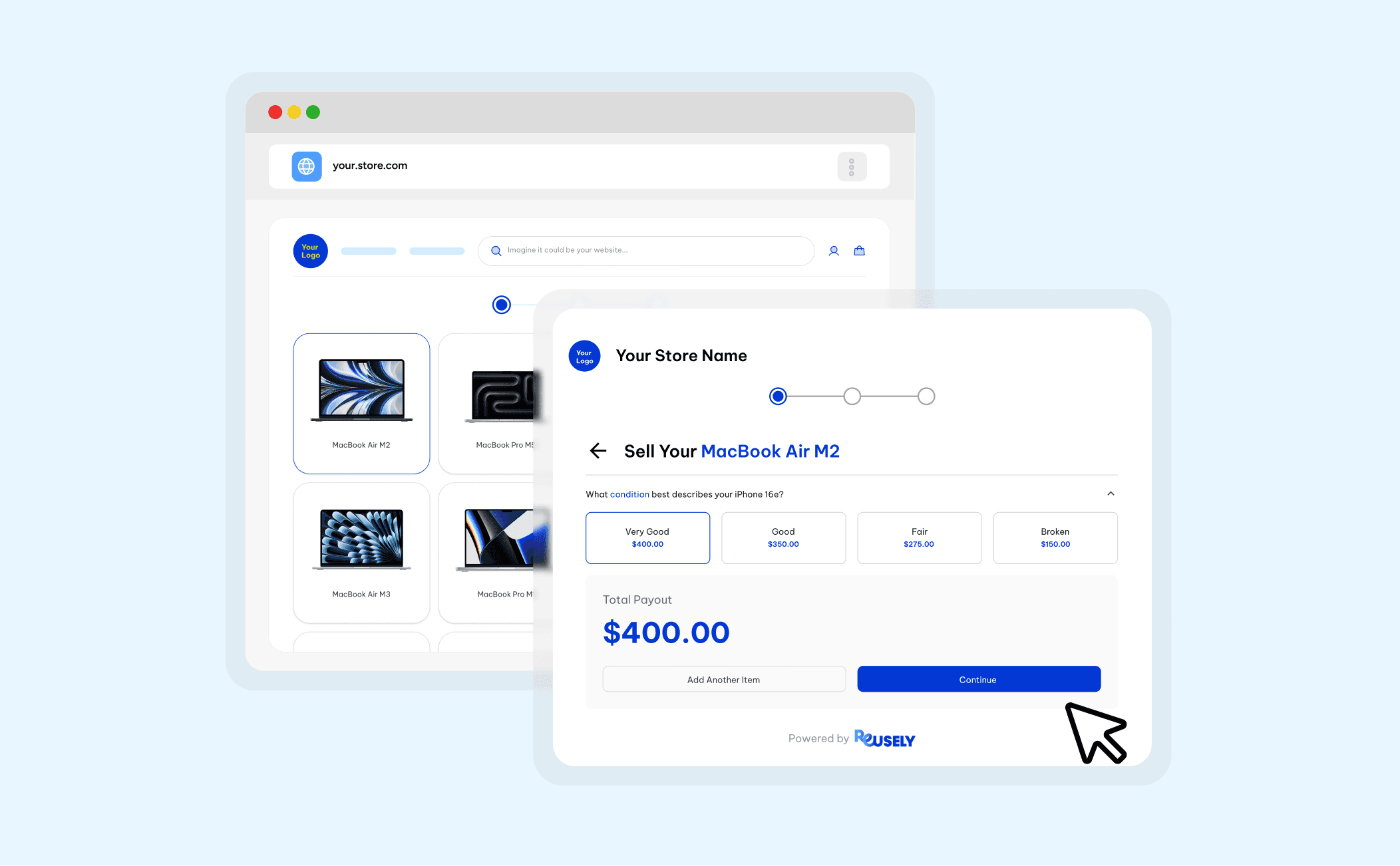
For customers, the process is simple. Reusely's Buyback Widget can be embedded directly into your existing website, allowing customers to select their MacBook, answer questions about its condition, and receive an estimated value on the spot. Customers can see what their device may be worth before deciding whether to visit your store.
You already have the technicians, tools, and customers to turn MacBook repairs into new revenue opportunities. Reusely gives you the system to connect the rest, from product data and consistent pricing to a customer-friendly trade-in experience. Ready to put it into practice? Explore Reusely's Buyback Widget or view the pricing plans to get started.






" width="1304.414px"/></svg>)